Task 3:Basic Linux Command
INTRODUCTION
Welcome to all DevOps learner. Day 3 of #90daysofdevops, today we'll learn the wonder of linux command.
To view what's written in a file.
The simplest way to view the contents of a file is using the
catcommand. it will show all content of file.
To change the access permissions of files.
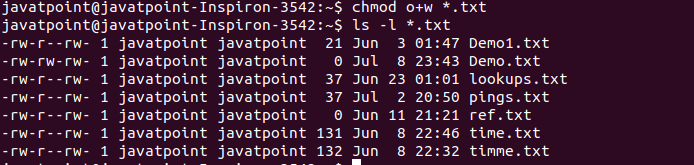
Changing the access permisssion of files is done using command "chmod" . The
chmodcommand allows you to modify the read, write, and execute permissions for the owner, group, and others on a file.Now, let's see some examples of how to use
chmod:chmod u=rwx,g=rx,o=r filename
To check which commands you have run till now.
To check the commands you have run till now. you can use the "history"
command.

To remove a directory/ Folder.
In linux we can use
rmcommand to remove a directory (folder). And if you want it to remove forcefully you can use rm -rf. it will remove any file forcefully.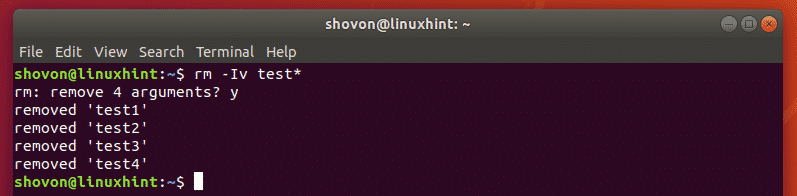
To create a fruits.txt file and to view the content.
To create a fruits.txt file you can use the "touch" command.
Next, to view the content we can use "cat" command.
Add content in devops.txt (One in each line) - Apple, Mango, Banana, Cherry, Kiwi, Orange, Guava.
To add the content in fruits.txt file we can use the editor. eg, vim,nano,vi etc. it will help you to edit you file.
To Show only top three fruits from the file.
To show the only top 3 fruits from fruits.txt file, you can use "head" command with the "-n" option. specifying the number of line you want to see.
To Show only bottom three fruits from the file.
To show only the bottom three lines of a file in Linux, you can use the tail command with the -n option. The tail command is typically used to display the end (tail) of a file.
To create another file Colors.txt and to view the content.
To create a new file name colors.txt in linux. you use "touch" command and to view content use "cat" command.
Add content in Colors.txt (One in each line) - Red, Pink, White, Black, Blue, Orange, Purple, Grey.
To add the specified content to the "colors.txt" file with each color on a separate line, you can use the following command.
echo "Red" >> Colors.txt echo "Pink" >> Colors.txt echo "White" >> Colors.txt echo "Black" >> Colors.txt echo "Blue" >> Colors.txt echo "Orange" >> Colors.txt echo "Purple" >> Colors.txt echo "Grey" >> Colors.txt
To find the difference between fruits.txt and Colors.txt file.
To find the difference between fruits.txt and colors.txt file, you can use "diff" command.
Thank you for reading.